有的没的
现在我们的每一个设备都有公网地址了,但要想被外部访问,需要防火墙放行才行。
ipv6 就不需要像 ipv4 进行转发了,直接放行端口甚至 ip 就行。
如上图所示,进入「网络 - 防火墙 - 通信规则」点击下面的添加按钮:
【常规设置】
协议:按需选择,注意 ping 使用的是 ICMP 协议,不是 TCP/UDP。
源区域:wan
目标区域:lan(如果要访问路由器自己则选择「设备」)
目标端口:自行设置
操作:接受
【高级设置】
地址族限制:仅 IPv6
保存一下就好。
注意,这样配置防火墙实际上是允许以 IPv6 访问任意子网设备的指定端口。
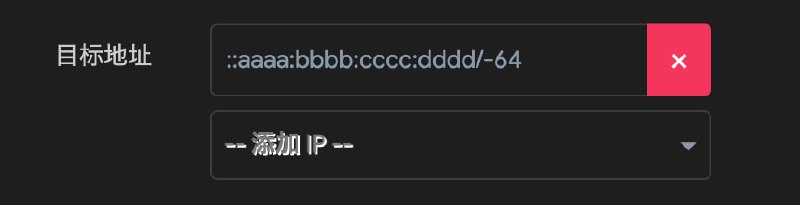
如果希望只放行特定的目标设备,可以指定 IP 后缀。因为运营商分配给我们的前缀是动态变化的,所以不能直接指定 IP,而后缀无论是使用 DHCPv6 还是 SLAAC(使用 eui64),经过配置都可以确保不变。然后添加防火墙规则时填写「目标地址」为 ::aaaa:bbbb:cccc:dddd/-64,其中 -64 的意思是匹配从右往左的 64 位。若部分系统不支持这种缩写,可以回退到 IPv4 的掩码表示形式:::aaaa:bbbb:cccc:dddd/::ffff:ffff:ffff:ffff。
附录
常见前缀
240e::/20: 中国电信
2409:8000::/20: 中国移动
2408:8000::/20: 中国联通
2000::/3: 全局单播地址。也就是全球可路由的公网地址。上述三个都属于这个。
FE80::/10: 链路本地地址。
2002::/16: 仅供 6to4 隧道使用
特殊地址
:: - 相当于 0.0.0.0
::1/128 - 本地回环地址,相当于 127.0.0.1/32
在线小工具
#network
关于armbian (network manager)以 eui64 的形式获取 Ipv6
刚开始编辑 sysctl 很久发现 ipv6 还不是 eui64, 问了 llm 都没回答对。
查了一下,因为是 network manager接管了这一块,而不是内核管理,随意编辑 sysctl 没用。
查看Linux_ipv6_无状态_设置为_eui64_有状态ipv6更改后缀
—-节选—-
修改 ipv6 无状态地址的缺省模式 addr_gen_mode 为 eui64
检查系统是否有 nmcli 命令。如果没有。-->网络是由内核直接管理的修改方法
执行 nmcli net 检查 NetworkManager 是否启用。
如果返回 disabled 即没启用,-->网络由内核直接管理的修改方法
如果返回 enabled 即启用了。
执行 nmcli device 查看对应的网卡设备是否由 NetworkManager 管理。
显示绿色的 connected 就是由 NetworkManager 管理的。-->由 NetworkManager 管理的修改方法
显示灰色的 unmanaged 是 NetworkManager 没有管理的。-->网络由内核直接管理的修改方法
你也可以考虑,启用NetworkManager对此网卡的管理。 -->见文章后面的“让 NetworkManager 管理有线网卡”
—-
网络由 NetworkManager 管理的,修改eui64方法
Armbian或Debian系统,改缺省无状态ipv6 为 stable-privacy
看帮助 man NetworkManager.conf。
修改 cd /etc/NetworkManager/system-connections/ 目录中对应网卡的文件。比如,Armbian_ethernet文件
[ipv6]
- addr-gen-mode=stable-privacy
+ #addr-gen-mode=stable-privacy
+ addr-gen-mode=eui64
dns-search=
Armbian_ethernet 文件中包含interface-name=eth0 , 所以这个文件是设置有线网卡的。
如果要设置无线网卡为eui64,则去修改对应的包含interface-name=wlan0的配置文件。
对eui64地址,valid_flt 和 preferred_lft 缺省值的修改。debian系统。(未测试)。
看 man systemd.network 有提到 ValidLifetimeSec=,PreferredLifetimeSec=。
另外,sysctl -a| grep _lft 能看到,
net.ipv6.conf.all.temp_prefered_lft = 86400
net.ipv6.conf.all.temp_valid_lft = 604800
net.ipv6.conf.default.temp_prefered_lft = 86400
net.ipv6.conf.default.temp_valid_lft = 604800
但 eui64实际的 valid_lft 远小于 604800,prefered_lft 远大于 86400。
对比 eui64地址的 lft,和路由器上 ipv6-prefix的 lft 基本一样,只差几秒。(2023-10测)
可是,在路由上设置 IPv6 RA Settings -> RA Livetime 为 1800sec,对客户机eui64的两个 lft没影响。
CentOS 或 Debian 修改之后。 systemctl restart NetworkManager 重启服务,即可生效。
#network
刚开始编辑 sysctl 很久发现 ipv6 还不是 eui64, 问了 llm 都没回答对。
查了一下,因为是 network manager接管了这一块,而不是内核管理,随意编辑 sysctl 没用。
查看Linux_ipv6_无状态_设置为_eui64_有状态ipv6更改后缀
—-节选—-
修改 ipv6 无状态地址的缺省模式 addr_gen_mode 为 eui64
检查系统是否有 nmcli 命令。如果没有。-->网络是由内核直接管理的修改方法
执行 nmcli net 检查 NetworkManager 是否启用。
如果返回 disabled 即没启用,-->网络由内核直接管理的修改方法
如果返回 enabled 即启用了。
执行 nmcli device 查看对应的网卡设备是否由 NetworkManager 管理。
显示绿色的 connected 就是由 NetworkManager 管理的。-->由 NetworkManager 管理的修改方法
显示灰色的 unmanaged 是 NetworkManager 没有管理的。-->网络由内核直接管理的修改方法
你也可以考虑,启用NetworkManager对此网卡的管理。 -->见文章后面的“让 NetworkManager 管理有线网卡”
—-
网络由 NetworkManager 管理的,修改eui64方法
Armbian或Debian系统,改缺省无状态ipv6 为 stable-privacy
看帮助 man NetworkManager.conf。
修改 cd /etc/NetworkManager/system-connections/ 目录中对应网卡的文件。比如,Armbian_ethernet文件
[ipv6]
- addr-gen-mode=stable-privacy
+ #addr-gen-mode=stable-privacy
+ addr-gen-mode=eui64
dns-search=
Armbian_ethernet 文件中包含interface-name=eth0 , 所以这个文件是设置有线网卡的。
如果要设置无线网卡为eui64,则去修改对应的包含interface-name=wlan0的配置文件。
对eui64地址,valid_flt 和 preferred_lft 缺省值的修改。debian系统。(未测试)。
看 man systemd.network 有提到 ValidLifetimeSec=,PreferredLifetimeSec=。
另外,sysctl -a| grep _lft 能看到,
net.ipv6.conf.all.temp_prefered_lft = 86400
net.ipv6.conf.all.temp_valid_lft = 604800
net.ipv6.conf.default.temp_prefered_lft = 86400
net.ipv6.conf.default.temp_valid_lft = 604800
但 eui64实际的 valid_lft 远小于 604800,prefered_lft 远大于 86400。
对比 eui64地址的 lft,和路由器上 ipv6-prefix的 lft 基本一样,只差几秒。(2023-10测)
可是,在路由上设置 IPv6 RA Settings -> RA Livetime 为 1800sec,对客户机eui64的两个 lft没影响。
CentOS 或 Debian 修改之后。 systemctl restart NetworkManager 重启服务,即可生效。
#network
好文章! 关于openwrt 的ipv6设置以及防火墙设置!
注意!!即使路由器已经设定eui64 分配,但是客户端有权决定启不启用 eui64。所以对于 linux 客户端,还需要进行配置。见下面几篇文章。
https://github.com/Aethersailor/Custom_OpenClash_Rules/wiki/OpenWrt-IPv6-%E8%AE%BE%E7%BD%AE%E6%96%B9%E6%A1%88
#network
注意!!即使路由器已经设定eui64 分配,但是客户端有权决定启不启用 eui64。所以对于 linux 客户端,还需要进行配置。见下面几篇文章。
https://github.com/Aethersailor/Custom_OpenClash_Rules/wiki/OpenWrt-IPv6-%E8%AE%BE%E7%BD%AE%E6%96%B9%E6%A1%88
#network
GitHub - DustinWin/ruleset_geodata: 定制适合 Clash、mihomo 和 sing-box 内核的 ruleset&geodata 文件
https://github.com/DustinWin/ruleset_geodata
#network
https://github.com/DustinWin/ruleset_geodata
#network
目前所有都试过,因为公司一直在升级,从最开始的手机扔公司,可用tailscale组网,然后随便用个内网控制软件就可以。后来需要人脸,就琢磨wifi打卡,esp32写了个发射wifi模拟mac地址和ssid就可以用。后来智能蓝牙打卡了,用软件直接模拟一个安卓手机就可以,现在是动态蓝牙,只能写了个esp32发射端和接收端。发射端放在公司接受蓝牙信号,mqtt发送到服务器,接收端插电就能接收到最新蓝牙数据。 然后在任何地方手机扫脸打卡
https://www.yaohuo.me/bbs-1458466.html?lpage=
#work
https://www.yaohuo.me/bbs-1458466.html?lpage=
#work
ax6600 libwrt集成的lucky和官方的luci-app-lucky不兼容。一般就不用去动这个luci-app-lucky. 更新的时候只动本体就行?
rax3000m上使用的官方三件套。luci-app-lucky i8n语言包 lucky。可以和官方github repo的无缝兼容升级
#network
rax3000m上使用的官方三件套。luci-app-lucky i8n语言包 lucky。可以和官方github repo的无缝兼容升级
#network
3. 放在 xray
4. - 购物卡2025年底到期 卖出去
5. - 给wenqi考试材料
6. - 眼底进行检查
8. 再对比一下之前的rule-set和换成geosite转的ruleset的内容的区别。
9. dns的那个地方的geosite也换成mrs
10.结合dustwin的规则集,最好替代所有的classical规则集
11. fakeip filter看看能采用规则集不
#plan
写成了第一个 stun cf 反代脚本
有一点:反代不能直接用 ip 回源,要用域名。要不就会报 direct access.
所以对于 stun,目前 ipv4 一个域名,v6 一个域名,xray 的 ip4p 透传一个域名。
这样正好脚本里面采用 ipv4 域名加上 ip4p 解析出来的端口来回源
—-
又补充了 302 版本。
发现 uptime kuma 支持 307,那就不走 cf 了,直接用 worker 解析 ip4p 后 307.(ai 推荐用 307)
都放在了 autoCPE repo 里
#network #programming
有一点:反代不能直接用 ip 回源,要用域名。要不就会报 direct access.
所以对于 stun,目前 ipv4 一个域名,v6 一个域名,xray 的 ip4p 透传一个域名。
这样正好脚本里面采用 ipv4 域名加上 ip4p 解析出来的端口来回源
—-
又补充了 302 版本。
发现 uptime kuma 支持 307,那就不走 cf 了,直接用 worker 解析 ip4p 后 307.(ai 推荐用 307)
都放在了 autoCPE repo 里
#network #programming
Shadowrocket 测试版更新
Version 2.2.70 (2756)
测试内容:
* chore(network): add support for IP4P address format
群组 @ShadowrocketApp
频道 @ShadowrocketNews
邮箱 [email protected]
Version 2.2.70 (2756)
测试内容:
* chore(network): add support for IP4P address format
群组 @ShadowrocketApp
频道 @ShadowrocketNews
邮箱 [email protected]
[标题](教程)免费开联通云盘500G定向流量,全国可开(阅893)
[时间]2025-08-23 10:32获赏2098
网址:https://panservice.mail.wo.cn/h5/activitymobile/freedatapkg?touchpoint=300300010035&clientType=iOS&appVersionCode=5.0.4&clientid=1001000035
有的需要开会员 开一个10元的就好了,有的直接就开了
我2个号一个直接开没要开会员,一个需要开付费的,开10元就好了
免费分享,您的妖精是我们持续分享的动力。~···
有能力的支持点妖精,谢谢
[时间]2025-08-23 10:32获赏2098
网址:https://panservice.mail.wo.cn/h5/activitymobile/freedatapkg?touchpoint=300300010035&clientType=iOS&appVersionCode=5.0.4&clientid=1001000035
有的需要开会员 开一个10元的就好了,有的直接就开了
我2个号一个直接开没要开会员,一个需要开付费的,开10元就好了
免费分享,您的妖精是我们持续分享的动力。~···
有能力的支持点妖精,谢谢
[标题]联通云盘500g免流包免费领(阅926)
[时间]2025-08-23 10:34获赏666
论坛里还有30帮开的业务我也是没想到。。。。
联通号码都能开,目前看上去没有加限制,如果开不了就去联通云盘app领个免费会员就能开。
https://panservice.mail.wo.cn/h5/activitymobile/freedatapkg?touchpoint=300300010035&clientType=iOS&appVersionCode=5.0.4&clientid=1001000035
#network
[时间]2025-08-23 10:34获赏666
论坛里还有30帮开的业务我也是没想到。。。。
联通号码都能开,目前看上去没有加限制,如果开不了就去联通云盘app领个免费会员就能开。
https://panservice.mail.wo.cn/h5/activitymobile/freedatapkg?touchpoint=300300010035&clientType=iOS&appVersionCode=5.0.4&clientid=1001000035
#network
一个从长计议的目标的实现——stun!!!!!
重头戏就是要固定 lucky 进行 stun 的隧道端口。
之前默认是 0,会利用 upnp 随机开一个端口,死活不行。
这下选了一个固定端口,并且在防火墙开放
并且clash 中增加端口规则:3478 direct!!
---
暑假最后一周终于回到爸妈家,计划已久的 rax3000m 部署工作即将开始!
首先这活儿我考虑了一下,怕远程 tr069 给覆盖了,就没有自己动手。回家第二天打电话给运维,令我惊讶的是:1. 户主不是我不影响提供上门服务 2.他们愿意上门给我改桥接。
师傅上门之后很快完成了,我拨号之后发现得到了 10 开头的 ipv4 还有一个 ipv6,欣然和师傅道别。点个赞!
跟师傅确认了,改了桥接之后会不会远程下发配置给还原了,他说咱们这儿不会。
之后我就开始慢慢挖掘。。。。
首先安装了 lucky,配置好了 v4\v6 的 ddns,同时开始尝试 stun。
注意 stun 需要给他分配一个监听端口,这个监听端口是作为某个 process 端口的转发。stun 打洞成功之后,公网 port 就是对应这个监听端口的。所以需要这个监听端口没有被占用,而且要在防火墙里面接受传入。
因为 openclash 接管了出站流量,这会对联系 stun 服务器有影响。好在 stun 协议走的是 3478 端口。所以我在 prlrules 里面把所有 3478port 都direct 了。
设置完之后,stun 很快的成功了!并且配好了stun 发生改变的提醒脚本,改变 ip4p 的 AAAA record,并且企业微信推送。
---
接下来就是一些善后工作了,包括我编写了一个 cf worker,每当请求时,他会解析 AAAArecord,然后组成一个新的clash 的 proxy provider 再 respond.
2025-08-23,这一天比较特殊,SR 的 dev 接纳了我的 ip4p 支持的建议。可惜我没有 SR 的 tf,现在还在想办法怎么测试。
至此,stun 的意义更加明显了。apple 系使用 shadowrocket / mihomo core作为回家工具,android/windows 系采用 mihomo core 的工具来完成回家。
希望稳定运行吧。这几天看见stun 映射关系还是挺稳定的。
#network
重头戏就是要固定 lucky 进行 stun 的隧道端口。
之前默认是 0,会利用 upnp 随机开一个端口,死活不行。
这下选了一个固定端口,并且在防火墙开放
并且clash 中增加端口规则:3478 direct!!
---
暑假最后一周终于回到爸妈家,计划已久的 rax3000m 部署工作即将开始!
首先这活儿我考虑了一下,怕远程 tr069 给覆盖了,就没有自己动手。回家第二天打电话给运维,令我惊讶的是:1. 户主不是我不影响提供上门服务 2.他们愿意上门给我改桥接。
师傅上门之后很快完成了,我拨号之后发现得到了 10 开头的 ipv4 还有一个 ipv6,欣然和师傅道别。点个赞!
跟师傅确认了,改了桥接之后会不会远程下发配置给还原了,他说咱们这儿不会。
之后我就开始慢慢挖掘。。。。
首先安装了 lucky,配置好了 v4\v6 的 ddns,同时开始尝试 stun。
注意 stun 需要给他分配一个监听端口,这个监听端口是作为某个 process 端口的转发。stun 打洞成功之后,公网 port 就是对应这个监听端口的。所以需要这个监听端口没有被占用,而且要在防火墙里面接受传入。
因为 openclash 接管了出站流量,这会对联系 stun 服务器有影响。好在 stun 协议走的是 3478 端口。所以我在 prlrules 里面把所有 3478port 都direct 了。
设置完之后,stun 很快的成功了!并且配好了stun 发生改变的提醒脚本,改变 ip4p 的 AAAA record,并且企业微信推送。
---
接下来就是一些善后工作了,包括我编写了一个 cf worker,每当请求时,他会解析 AAAArecord,然后组成一个新的clash 的 proxy provider 再 respond.
2025-08-23,这一天比较特殊,SR 的 dev 接纳了我的 ip4p 支持的建议。可惜我没有 SR 的 tf,现在还在想办法怎么测试。
至此,stun 的意义更加明显了。apple 系使用 shadowrocket / mihomo core作为回家工具,android/windows 系采用 mihomo core 的工具来完成回家。
希望稳定运行吧。这几天看见stun 映射关系还是挺稳定的。
#network
Prompt Engineering: What Actually Works (Without the 8-Hour Hype)
I’ve seen people drop 8-hour-long videos on prompt engineering, and honestly, my reaction is 🤦♂️.
I won’t bore you with the obvious stuff or overcomplicate things. Instead, I want to share a few practical techniques that actually helped me write better prompts, some common sense, some hard-earned lessons. Most of what I’m sharing comes from the book Hands-On Large Language Models
So here’s what I’ve learned that actually works:
1. Specificity
This one seems obvious, but it’s also the most commonly missed.
A vague prompt gives you a vague answer. The more precise you are about your goal, format, and constraints, the better the result.
Bad Prompt:
Good Prompt:
See the difference? Specific inputs = Specific outputs.
2. Hallucination Guardrail
We all know that LLMs hallucinate, they confidently make stuff up.
A surprisingly simple trick: Tell it not to.
Try this prompt:
This becomes really important when you're designing apps or knowledge assistants. It helps reduce the risk of wrong answers.
3. Order Matters
This was a surprise to me and I learned it from the book.
Where you place your instruction in a long prompt matters. Either put it right at the start or at the end. LLMs often forget what’s in the middle (especially in long prompts).
Example:
Here's a paragraph. Also here's a use case. Here's some random info. Now summarize.
Simple shift, big difference.
Other Techniques That Help Me Daily
1. Persona:
Set the role clearly.
This changes the behavior completely.
2. Audience Awareness:
My favorite when I want to simplify things.
Works brilliantly for breaking down tough concepts.
3. Tone:
Underrated but essential.
Want a formal reply?
4. Instruction / Context:
Always useful.
Gives the model direction and expected output format.
5. Grammar Fixing:
As a non-native English speaker, this one’s gold for me.
It has helped me immensely in writing better content, emails, blogs, even this post :-)
These are the techniques I use regularly. If you have your own prompt engineering hacks, I’d love to hear them, drop them in the comments!
https://www.reddit.com/r/LocalLLaMA/s/5pIxRi5BU6
#ai
I’ve seen people drop 8-hour-long videos on prompt engineering, and honestly, my reaction is 🤦♂️.
I won’t bore you with the obvious stuff or overcomplicate things. Instead, I want to share a few practical techniques that actually helped me write better prompts, some common sense, some hard-earned lessons. Most of what I’m sharing comes from the book Hands-On Large Language Models
So here’s what I’ve learned that actually works:
1. Specificity
This one seems obvious, but it’s also the most commonly missed.
A vague prompt gives you a vague answer. The more precise you are about your goal, format, and constraints, the better the result.
Bad Prompt:
Write something about climate change.Good Prompt:
Write a 100-word summary on how climate change affects sea levels, using simple language for a high school audience.See the difference? Specific inputs = Specific outputs.
2. Hallucination Guardrail
We all know that LLMs hallucinate, they confidently make stuff up.
A surprisingly simple trick: Tell it not to.
Try this prompt:
If you don’t know the answer, respond with ‘I don’t know.’ Don’t make anything up.This becomes really important when you're designing apps or knowledge assistants. It helps reduce the risk of wrong answers.
3. Order Matters
This was a surprise to me and I learned it from the book.
Where you place your instruction in a long prompt matters. Either put it right at the start or at the end. LLMs often forget what’s in the middle (especially in long prompts).
Example:
Here's a paragraph. Also here's a use case. Here's some random info. Now summarize.
Summarize the following paragraph:" [then the content]Simple shift, big difference.
Other Techniques That Help Me Daily
1. Persona:
Set the role clearly.
You are an expert Python developer who writes clean code.This changes the behavior completely.
2. Audience Awareness:
My favorite when I want to simplify things.
Explain this like I’m five.Works brilliantly for breaking down tough concepts.
3. Tone:
Underrated but essential.
Want a formal reply?
Write this in a professional tone for a client. vs Make this sound like I’m texting a friend.4. Instruction / Context:
Always useful.
Summarize the following news article in bullet points.Gives the model direction and expected output format.
5. Grammar Fixing:
As a non-native English speaker, this one’s gold for me.
Fix the grammar and make it sound more natural.It has helped me immensely in writing better content, emails, blogs, even this post :-)
These are the techniques I use regularly. If you have your own prompt engineering hacks, I’d love to hear them, drop them in the comments!
https://www.reddit.com/r/LocalLLaMA/s/5pIxRi5BU6
#ai